Common Setup
Every configuration for a production install: server, domains, background jobs and shared services.
Where Settings Live
| Kind of setting | Where |
|---|---|
App URL (APP_URL), frontend URL (FRONTEND_URL) and the database (DB_*): the only values you set, and the web installer writes them. Installer-managed: APP_KEY, APP_INSTALLED, APP_ENV, APP_DEBUG, DB_CONNECTION. Optional server keys: logging, queue, cache, session drivers, SSL provisioner, Docker hosting, AI_FAKE, demo mode | backend/.env (run php artisan config:clear after editing on a cached config). The session cookie domain, Sanctum stateful hosts, secure cookies and the CORS origin are derived from APP_URL + FRONTEND_URL; see Backend .env. |
| General/branding, auth and Google / mobile sign-in client ids, AI switches and the AI research (Brave) key, payments (tax, invoice details, Stripe, PayPal, manual, currency, return URLs, pending-order expiry, store refund window), storage, mail, captcha, analytics, scripts, maintenance, mobile app (FCM push, app versions), data store (MySQL admin), platform (sites domain, server IP, frontend URL, badge, licence, admin 2FA); also ads (Meta / Google), workspace regional defaults and publishing / export disks and export TTL | Super-admin Settings page (14 tabs), stored in the settings table (created by SettingSeeder); secrets encrypted with APP_KEY. The old .env keys (MAIL_*, PAYPAL_*, BUILDORA_SITES_DOMAIN, …) are no longer in .env.example and are read only as a fallback. |
| AI providers and keys, task routing, AI models, credit costs, model pricing | Super-admin → AI Studio, stored encrypted in the database |
| Plans, credit packs, coupons, hosting add-on packs, domain catalog, hosting servers, email templates | Super-admin |
| Store (shop) payment methods of your customers | Each workspace’s own dashboard (Ecommerce → Settings → Payment methods), with their own merchant credentials |
| API URL, app name, Google login button, demo buttons of the web dashboard | frontend/.env.production (NEXT_PUBLIC_*, compiled in at build time) |
| Mobile app URLs, Google client ids | env/prod.json in the Flutter project (Mobile App) |
Web Server
The backend document root must be backend/public for the API host, the wildcard sites host and (as default_server) for your users’ custom domains. Nginx example:
/var/www/buildora in the commands on this page is an example install folder (YOUR_APP_FOLDER): replace it with your own path. api.example.com, sites.example.com and example.com stand for your own API, sites and frontend domains.
# API + admin + installer + published sites (subdomains) + custom domains
server {
    listen 80 default_server;          # custom domains of your users land here
    listen 443 ssl default_server;
    server_name api.example.com sites.example.com *.sites.example.com;   # bare sites.example.com = draft previews
    root /var/www/buildora/backend/public;
    index index.php;
    client_max_body_size 50M;

    ssl_certificate     /etc/letsencrypt/live/sites.example.com/fullchain.pem;   # wildcard cert
    ssl_certificate_key /etc/letsencrypt/live/sites.example.com/privkey.pem;

    location / { try_files $uri $uri/ /index.php?$query_string; }
    location ~ \.php$ {
        include fastcgi_params;
        fastcgi_param SCRIPT_FILENAME $realpath_root$fastcgi_script_name;
        fastcgi_pass unix:/run/php/php8.3-fpm.sock;
        fastcgi_read_timeout 180;
    }
    location ~ /\.(?!well-known) { deny all; }
}
The frontend (Next.js on port 3000, started with PM2) sits behind its own server block:
server {
    listen 443 ssl;
    server_name example.com www.example.com;
    location / {
        proxy_pass http://127.0.0.1:3000;
        proxy_set_header Host $host;
        proxy_set_header X-Forwarded-For $proxy_add_x_forwarded_for;
        proxy_set_header X-Forwarded-Proto $scheme;
    }
}
Apache: the shipped public/.htaccess works; enable mod_rewrite and AllowOverride All. Add ServerAlias sites.example.com *.sites.example.com to the API vhost (cPanel: add the subdomain sites.example.com and a wildcard subdomain *.sites.example.com, both with the same document root as the API). PHP: memory_limit ≥ 256M, max_execution_time ≥ 120, upload_max_filesize / post_max_size / client_max_body_size ≥ your media upload limit, proc_open enabled if you use the certbot SSL command.
Sites Domain & SSL
Every website gets https://{subdomain}.SITES_DOMAIN as soon as it is published.
DNS
*.sites.example.com A <server IP>andsites.example.com A <server IP>. The bare sites domain is required: draft previews are served fromhttps://sites.example.com/_preview/{token}, an origin isolated from the API and the admin panel. To use another host, setBUILDORA_PREVIEW_URLinbackend/.env; it must never be the API or frontend host.Web server
Route
sites.example.comand*.sites.example.comtobackend/public(see above). The certificate must cover both names (a wildcard alone does not cover the bare name).Sites domain
sites.example.comin the installer’s Settings step or Settings → Platform. Do not use the parent domain of your API host (e.g.example.comforapi.example.com): the API host would then be treated as a published site.Wildcard certificate
Let’s Encrypt needs the DNS-01 challenge for wildcards. On cPanel, AutoSSL covers the wildcard subdomain on most hosts. On Cloudflare, proxy the wildcard record and use Full (strict) with an origin certificate.
# e.g. with the Cloudflare DNS plugin
certbot certonly --dns-cloudflare --dns-cloudflare-credentials ~/.cf.ini \
  -d 'sites.example.com' -d '*.sites.example.com'
Test: curl -I https://anything.sites.example.com should return a Laravel 404 (unknown site), not a TLS error.
CDN & Proxy Cache Bypass Paths
A CDN or reverse-proxy cache (Cloudflare, Fastly, Nginx proxy_cache, LiteSpeed Cache) must never cache or rewrite dynamic, signed-in or webhook traffic. Create one “bypass cache” rule per line below. They are plain path prefixes (“URI path starts with”), not regular expressions.
| Host | Bypass cache when the URI path starts with | Why |
|---|---|---|
API host (api.example.com) | /api/ | REST API, sign-in, AI progress, data |
| API host | /api/v1/webhooks/ | Stripe and PayPal webhooks: the body must reach Laravel unchanged or the signature check fails (also disable “Rocket Loader”, minification and email obfuscation for this path) |
| API host | /api/v1/public/shop/ | Storefront checkout and shop gateway webhooks |
| API host | /admin | Filament admin panel |
| API host | /livewire- | Admin panel live updates and uploads (the path continues with a short id) |
| API host | /install | Web installer |
| API host | /sanctum/csrf-cookie, /login, /logout, /register, /two-factor-challenge, /forgot-password, /reset-password, /user/, /email/ | Cookie sign-in, two-factor and account endpoints |
| API host | /auth/google, /auth/handoff | Google login and the mobile-to-web hand-off |
| API host and sites | /_preview/ (sites domain), /_forms/, /_helpdesk/, /_kb/, /_a | Signed previews, form posts, help-center tickets and the analytics beacon |
Frontend (example.com) | Everything except /_next/static/ | The dashboard and editor are personalised pages; only /_next/static/ files are safe to cache long-term |
Safe to cache: /_next/static/ on the frontend, /storage/ (uploaded media and published-site assets) and /css/, /js/ and /fonts/ (admin panel assets) on the API host. The admin panel assets are pre-built in backend/public/css/filament, backend/public/js/filament and backend/public/fonts/filament (regenerated by php artisan filament:upgrade, which runs on composer install); the backend has no npm build step. The frontend build output is frontend/.next/. Published customer sites (*.sites.example.com and custom domains) can be cached for a short time (for example 2 minutes) if you accept that edits appear after the cache expires; bypass /_forms/ and /_a there.
Behind a CDN or load balancer, tell Laravel to trust it so the real visitor IP and HTTPS scheme are used (otherwise the sign-in rate limits treat all visitors as one IP): a developer adds $middleware->trustProxies(at: '*'); (or your proxy’s IP ranges instead of '*') inside ->withMiddleware(...) in backend/bootstrap/app.php. With Cloudflare in front of the API host, set SSL/TLS to Full (strict); “Flexible” makes Laravel think requests are plain HTTP and breaks secure cookies and redirects.
Custom Domains
Users connect their own domain under Website → Domains (plan feature custom_domain). They are shown these DNS records:
| Type | Host | Value |
|---|---|---|
| A | @ | your server’s public IPv4 (Settings → Platform → Server IP) |
| CNAME | www | {subdomain}.SITES_DOMAIN |
| TXT | _buildora-verify | the verification token |
Any of the three records verifies the domain. domains:check re-checks pending domains every hour from cron, and users can press Verify. Once verified, SSL is requested through SSL_PROVISIONER. Buildora has no built-in ACME client; choose one of these:
| Provisioner | Use when | Setup |
|---|---|---|
none (default) | TLS is terminated elsewhere: Caddy on-demand TLS, Cloudflare for SaaS, a load balancer | Caddy: see below |
command | Nginx/Apache + certbot on the same server | SSL_PROVISION_COMMAND="certbot certonly --nginx -n --agree-tos -m [email protected] -d {domain}", optional SSL_REVOKE_COMMAND="certbot delete -n --cert-name {domain}". The queue-worker user needs permission to run it (sudoers rule). |
Caddy on-demand TLS asks Buildora before issuing a certificate; GET /api/v1/tls-check?domain=… answers 200 only for an existing site subdomain or an active custom domain:
{
    on_demand_tls {
        ask https://api.example.com/api/v1/tls-check
    }
}
https:// {
    tls { on_demand }
    root * /var/www/buildora/backend/public
    php_fastcgi unix//run/php/php8.3-fpm.sock
    file_server
}
Domain catalog (Hosting & Domains → Domain catalog): you can sell domains or subdomains that you own (one-time, monthly or yearly). It is not a registrar integration.
Hosting Servers (Docker, optional)
By default published sites are served by the backend itself. Optionally you can run them on a VPS you own, one Docker container per workspace with the plan’s RAM limit, behind Traefik TLS (see Web Platform → Hosting). Buildora does not buy a VPS for you.
Prepare the VPS
Install Docker and Traefik with a
websecureentrypoint, a certificate resolver and a Docker network. Buildbackend/Dockerfile.hostingas the site image there.Access and storage
Give the backend’s system user SSH key access to a VPS user that can use Docker (add the host key to
known_hosts; never paste private keys into Buildora). Sharebackend/storagewith the VPS through a mount. Create a site-runtime env file on the backend host with database/cache values reachable from the VPS..env
HOSTING_DOCKER_ENABLED=trueandHOSTING_DOCKER_IMAGE,HOSTING_DOCKER_NETWORK,HOSTING_DOCKER_CERT_RESOLVER,HOSTING_DOCKER_ENV_FILE,HOSTING_DOCKER_STORAGE_PATH.Add it in the admin
Hosting & Domains → Hosting servers → Add server with an
ssh://user@host[:port]Docker address, public IP, capacity, image, network, resolver and paths → Test connection → Use for hosting. Then point the sites wildcard and custom-domain A records at that server.
Storage is enforced by Buildora’s upload/publish quotas, not a filesystem quota, and bandwidth is not metered. Only one server receives new sites at a time. Hosting add-on packs and other off-session renewals charge saved cards through Stripe only.
Permissions & Storage Link
cd /var/www/buildora/backend
chown -R www-data:www-data storage bootstrap/cache
chmod -R 775 storage bootstrap/cache
chmod 640 .env
php artisan storage:link
storage:link creates public/storage → storage/app/public, which serves uploaded media on the local disk. Published sites are written to the private local disk (the publishing disk setting, local by default) and served only through their own host names. The installer runs storage:link on Finish. The installer is locked by APP_INSTALLED=true in .env, the persistent storage/installed marker and the super admin in the database; keep storage/installed when you move or update the site.
Cron & Scheduler
Where to check it in the admin panel: the annotated Settings → System screenshot under Queue Worker (scheduler status and last heartbeat).
One entry for the web-server user, every minute. Use the full PHP path if php is not on cron’s PATH (which php).
* * * * * cd /var/www/buildora/backend && php artisan schedule:run >> /dev/null 2>&1
| When | Tasks (routes/console.php) |
|---|---|
| Every minute | Scheduler heartbeat, scheduled blog posts, scheduled e-mail campaigns, due social-post reminders, Docker container reconcile (only when Docker hosting is on) |
| Every 5 minutes | Hosting server health check (when a server is active), expiry of unpaid shop orders |
| Hourly | Analytics roll-up, custom-domain checks |
| Daily | Pending downgrades, renewals, pending-order expiry, hosting add-on and domain renewals, low-credit check, recurring and overdue invoices, account purges, version pruning, abandoned AI sites, export clean-up, ads sync, demo reset |
| Weekly | Orphaned media clean-up, orphaned files of deleted websites/workspaces (buildora:prune-orphans) |
List them with php artisan schedule:list. Settings → System info shows the last heartbeat.
Queue Worker
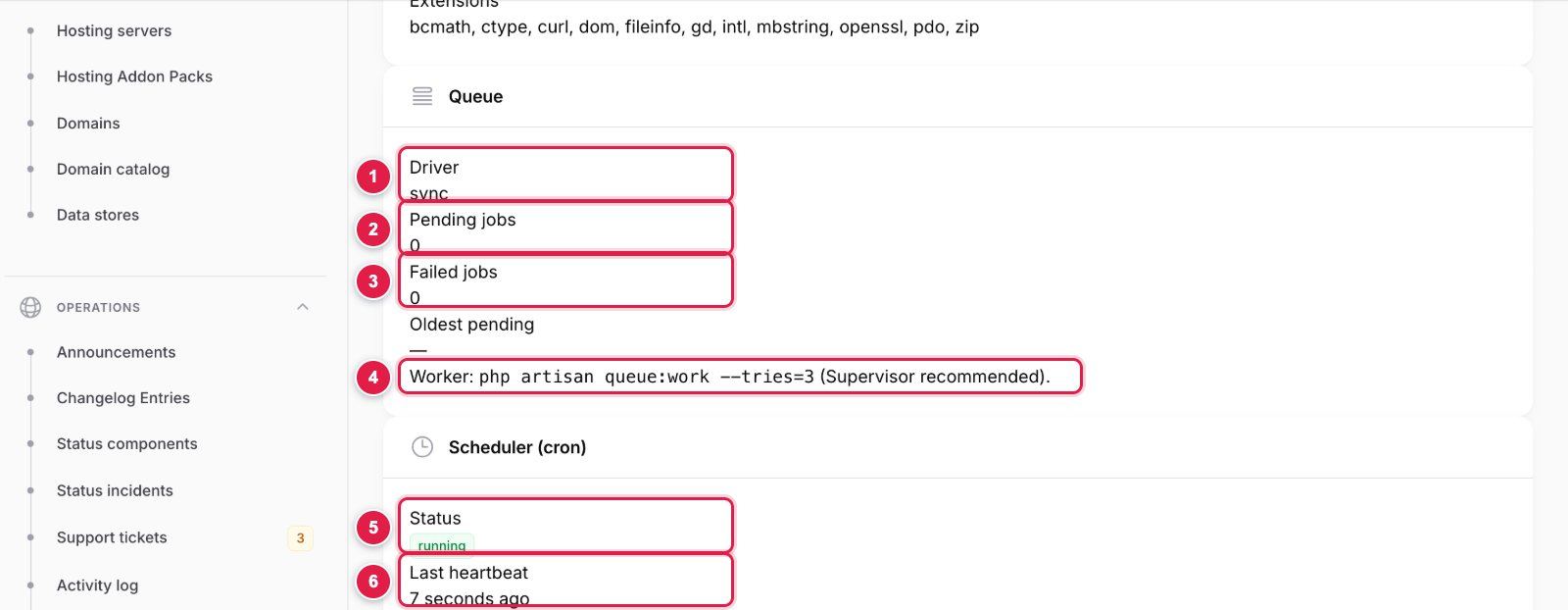
- Driver: should be
databaseorredisin production (syncruns jobs inside the web request). - Pending jobs: returns to 0 within seconds when a worker is running; a growing number means no worker.
- Failed jobs: inspect with
php artisan queue:failed, retry withphp artisan queue:retry all. - The worker command to keep running under Supervisor or systemd.
- Status: running when the scheduler wrote a heartbeat in the last 5 minutes, not detected otherwise.
- Last heartbeat: should never be older than a few minutes. Below it the page prints the exact cron line for your server path.
Use QUEUE_CONNECTION=database (or redis), never sync in production. AI website/page/copilot/restyle/translate jobs, ZIP and account exports, SSL provisioning, form and outbound webhooks, campaign sending, automations, ads sync and push notifications run on the queue. Supervisor config (/etc/supervisor/conf.d/buildora-worker.conf):
[program:buildora-worker]
command=php /var/www/buildora/backend/artisan queue:work database --sleep=3 --tries=3 --max-time=3600 --timeout=1500
autostart=true
autorestart=true
numprocs=2
user=www-data
redirect_stderr=true
stdout_logfile=/var/www/buildora/backend/storage/logs/worker.log
stopwaitsecs=3600
sudo supervisorctl reread && sudo supervisorctl update && sudo supervisorctl start buildora-worker:*
Keep DB_QUEUE_RETRY_AFTER (or REDIS_QUEUE_RETRY_AFTER) above the 1,500-second AI job timeout (for example 1800) so a long build is never started twice.
Shared hosting: add a second cron line instead of Supervisor:
* * * * * cd /home/YOUR_CPANEL_USERNAME/YOUR_APP_FOLDER/backend && /usr/local/bin/php artisan schedule:run >> /dev/null 2>&1
* * * * * cd /home/YOUR_CPANEL_USERNAME/YOUR_APP_FOLDER/backend && /usr/local/bin/php artisan queue:work --stop-when-empty --max-time=50 >> /dev/null 2>&1
Shared hosting (cPanel) without a long-running worker: add both lines as cron jobs. Replace the placeholders: YOUR_CPANEL_USERNAME is your cPanel username (cPanel → General Information → Home Directory) and YOUR_APP_FOLDER is the folder you uploaded Buildora to, so the path ends in the backend folder that contains artisan. /usr/local/bin/php is the usual cPanel PHP binary; use the PHP 8.3 path your host gives you. On a VPS use the Supervisor worker and the crontab line above instead.
After every deploy or update run php artisan queue:restart so workers load the new code.
Cache & Optimize
The installer writes CACHE_STORE=database and SESSION_DRIVER=database, which work everywhere. On larger installs use Redis (REDIS_*) for cache, sessions and the queue. Live collaboration and generation progress use cache-backed HTTP polling, so no websocket server is needed.
php artisan config:cache && php artisan route:cache && php artisan view:cache   # after every deploy
php artisan config:clear                                                         # after editing .env
php artisan optimize:clear                                                       # clear everything
Enable OPcache. Settings → System info also has a Clear cache button.
Set mail in the installer or Settings → Mail (mailer, from name/address, SMTP host, port, encryption, username, password; the password is stored encrypted) and press Send test email. Mail settings live in the database, not in .env (the old MAIL_* keys are no longer in .env.example). Supported: SMTP and Amazon SES (also sendmail and log). Until you configure a mailer the driver is log: nothing is sent (messages go to storage/logs).
Encryption: choose TLS (port 587, STARTTLS) or SSL (port 465).
Mail is used for e-mail verification, password reset, team invitations, form/lead notifications, billing and low-credit notices, support replies and data exports. The 13 editable templates are in Settings → Email templates; the installer creates them (EmailTemplateSeeder, on install only, so your edits survive updates). Set SPF and DKIM for the sending domain.
Mailgun appears in the mailer list but is not wired in 1.0.0; Postmark and Resend need their extra Composer packages. Use SMTP or SES.
Storage Drivers
Settings → Storage chooses the media disk for media-library and form uploads:
| Disk | Notes |
|---|---|
public (default) | storage/app/public, served as {APP_URL}/storage/… through storage:link |
s3 | Amazon S3 with the AWS_* keys |
s3compat | S3-compatible services: Cloudflare R2, Wasabi, DigitalOcean Spaces, MinIO. Access key, secret (encrypted), region, bucket, endpoint, public/CDN URL and path-style switch in the same tab, stored in the database (the old S3COMPAT_* .env keys are read only as a fallback) |
Region          auto (R2) · us-east-1 (MinIO) · nyc3 (Spaces)
Endpoint        https://<account>.r2.cloudflarestorage.com
Public/CDN URL  https://cdn.example.com     # public base URL (CDN / custom domain)
Path-style      on for MinIO and R2 · off for AWS
The same tab sets the max upload size (default 10 MB), allowed MIME types and WebP quality (default 82). Images get a WebP copy and responsive 400/800/1200/1600 px variants. Each workspace’s usage counts against its plan’s storage limit.
Choose the disk before users upload. Existing files are not migrated when the disk changes; each media row keeps resolving from the disk it was saved on.
Platform Payments
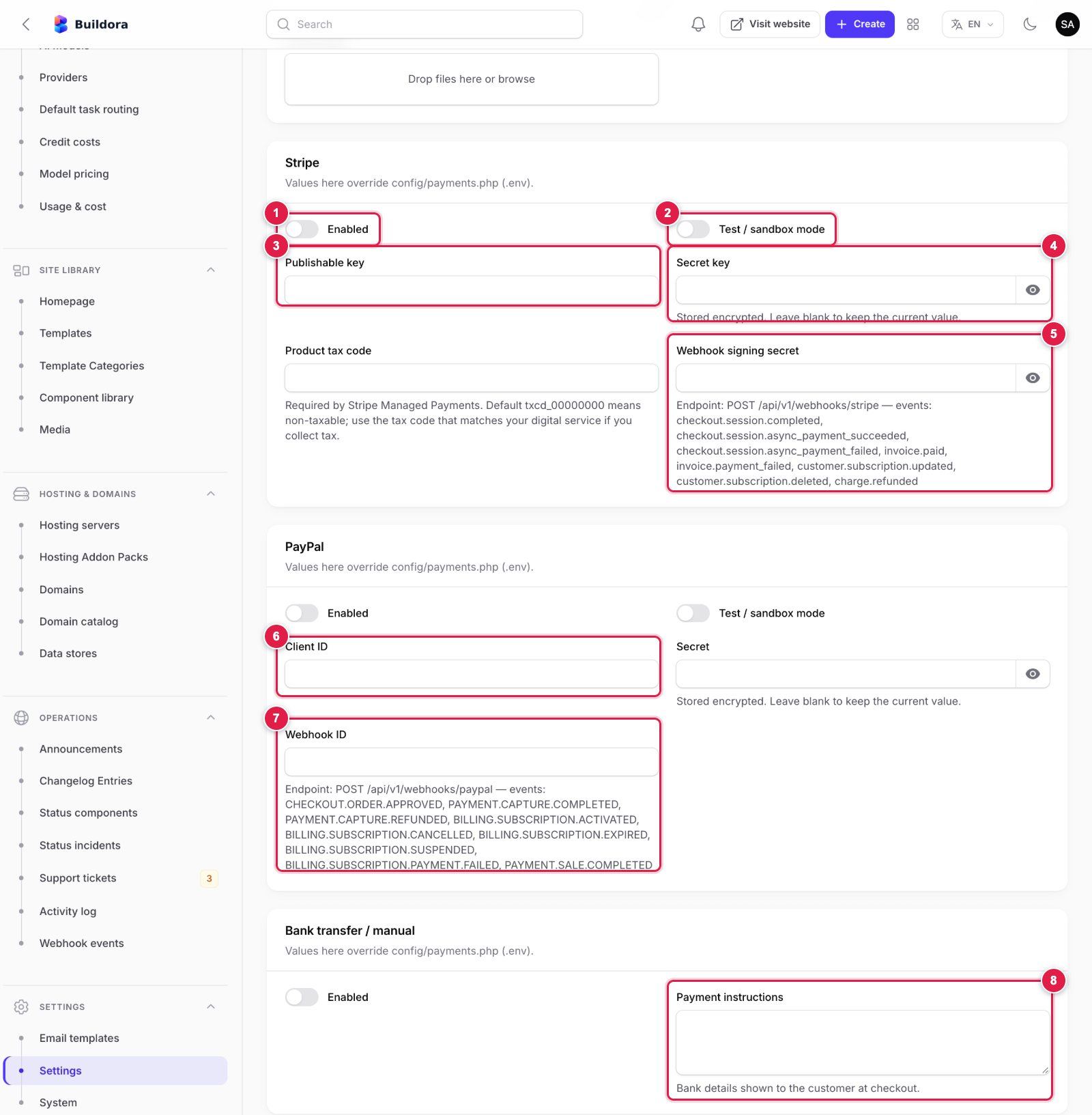
- Stripe → Enabled: turn Stripe Checkout on for plans and credit packs.
- Test / sandbox mode: on while you use
pk_test_/sk_test_keys; off with live keys. - Publishable key (
pk_…) from Stripe Dashboard → Developers → API keys. - Secret key (
sk_…or a restricted key); stored encrypted. - Webhook signing secret (
whsec_…): create a webhook endpoint in Stripe for the URL and events printed under the field, then paste its signing secret here. - PayPal → Client ID and Secret from the PayPal Developer Dashboard → Apps & Credentials (sandbox or live app); enable PayPal and set sandbox mode above them.
- Webhook ID: create a webhook in the same PayPal app for the URL and events printed under the field and paste the ID PayPal shows.
- Bank transfer / manual → Payment instructions: your bank details;
{order},{total}and{currency}are replaced at checkout. Approve uploaded proofs in Plans & Billing → Manual payments.
How your customers pay you for plans, credit packs, hosting add-ons and domains. Configure in Settings → Payments (stored in the database, keys encrypted). A fresh install starts with Stripe and PayPal in test / sandbox mode: switch them to live there once your live keys are in. The same tab holds the tax rate and label, company details, invoice logo and footer for the PDF invoices.
| Gateway | Keys | Webhook URL to register at the provider |
|---|---|---|
| Stripe | Publishable key, secret key, webhook signing secret, test mode | https://api.example.com/api/v1/webhooks/stripe |
| PayPal | Client id, secret, webhook id, mode sandbox/live | https://api.example.com/api/v1/webhooks/paypal |
| Manual / bank transfer | Instructions text with {order}, {total}, {currency} | None: users upload a receipt; approve it in Plans & Billing → Manual payments |
Then set prices, allowed gateways and gateway price ids per plan in Plans & Billing → Plans. The billing currency, return URLs, pending-order expiry (3 days) and the store refund window (180 days) are payment settings stored in the database (currency default USD); plans can carry per-currency price overrides. Webhook deliveries are stored and can be replayed in Operations → Webhook events. Renewals, dunning and pending-order expiry run from cron.
Test one sandbox purchase and one refund per gateway before going live. Saved-card features (credit auto-recharge, hosting add-on and domain renewals) work with Stripe only. Extra gateways can be added as one PHP class: implement backend/app/Services/Payments/Contracts/PaymentGateway.php and register it under gateways in backend/config/payments.php.
Store Payments (customers’ shops)
Online shops built with Buildora charge into the website owner’s own merchant account. Owners enter their credentials in their dashboard: Ecommerce → Settings → Payment methods, as a workspace default with optional per-website overrides. Nothing is configured in your admin except the plan features (ecommerce, online_payments).
| Method | Notes |
|---|---|
| Cash on delivery | Offline; the owner marks the order paid |
| Bank transfer | Instructions shown at checkout; auto-cancelled after the expiry window (default 168 h) |
| Stripe | Hosted Stripe Checkout; secret key + webhook signing secret; refunds |
| PayPal | Orders v2; client id, secret, webhook id; refunds (PayPal does not take every currency) |
| SSLCommerz | Hosted payment, BDT only; store id + store password |
| bKash | Tokenized checkout, BDT only; app key, app secret, username, password |
Each website shows its own webhook URL to copy: POST https://api.example.com/api/v1/public/shop/{website}/webhooks/{gateway}. The settings screen has Test connection for Stripe, PayPal and bKash.
The store gateway adapters are covered by automated tests against faked provider responses only; SSLCommerz and bKash have not been verified against the real services. Place a sandbox order for every method you enable before relying on it.
AI Providers & Models
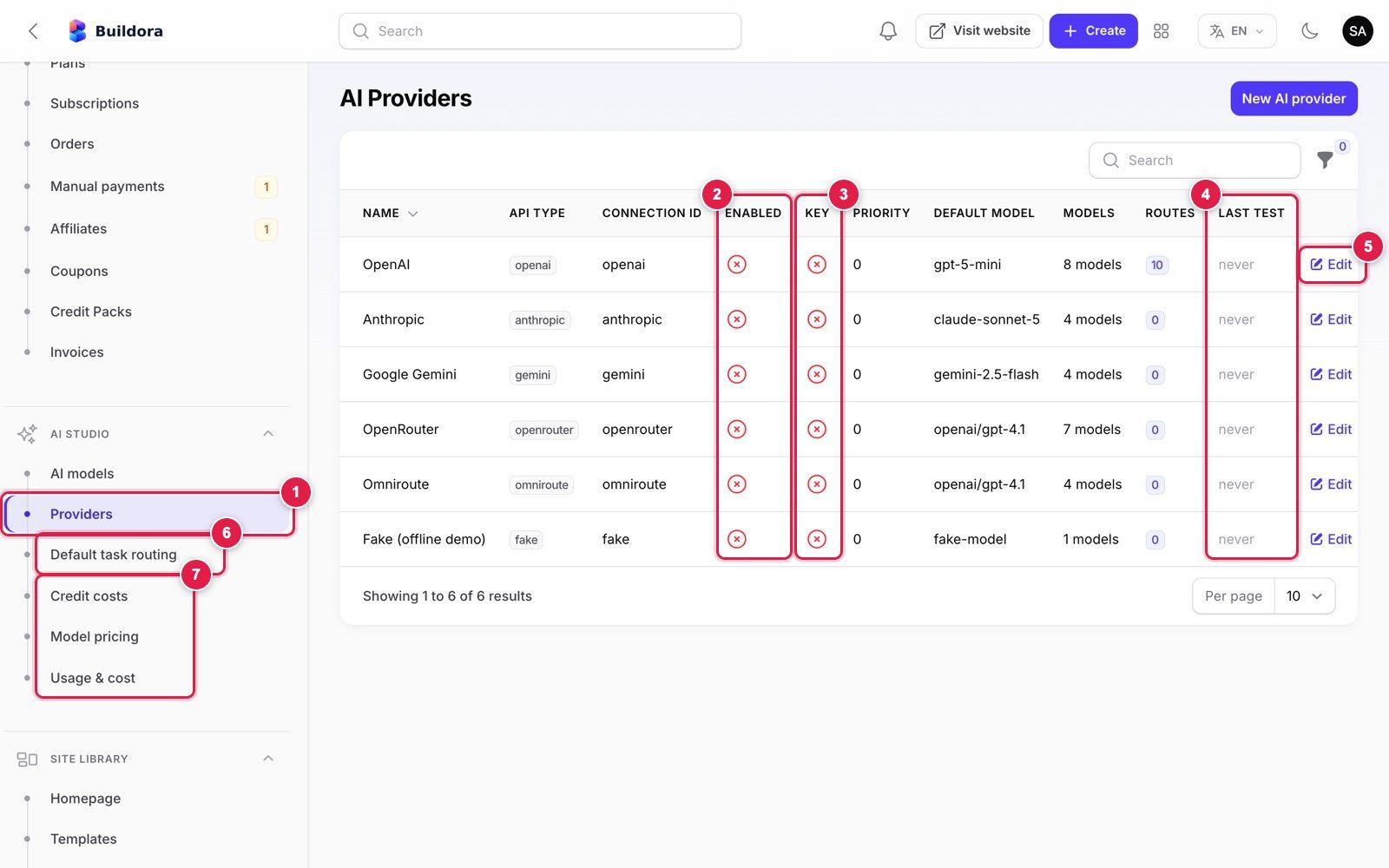
- AI Studio → Providers in the admin menu.
- Enabled: a red cross means the provider is off. All six ship off.
- Key: a red cross means no API key is stored yet.
- Last test: when Test connection last ran (“never” on a fresh install).
- Edit opens the provider form (next image).
- Default task routing: which provider/model each of the 10 AI tasks uses, with a fallback.
- Credit costs, Model pricing and Usage & cost: what customers pay in credits and what the provider charges you.
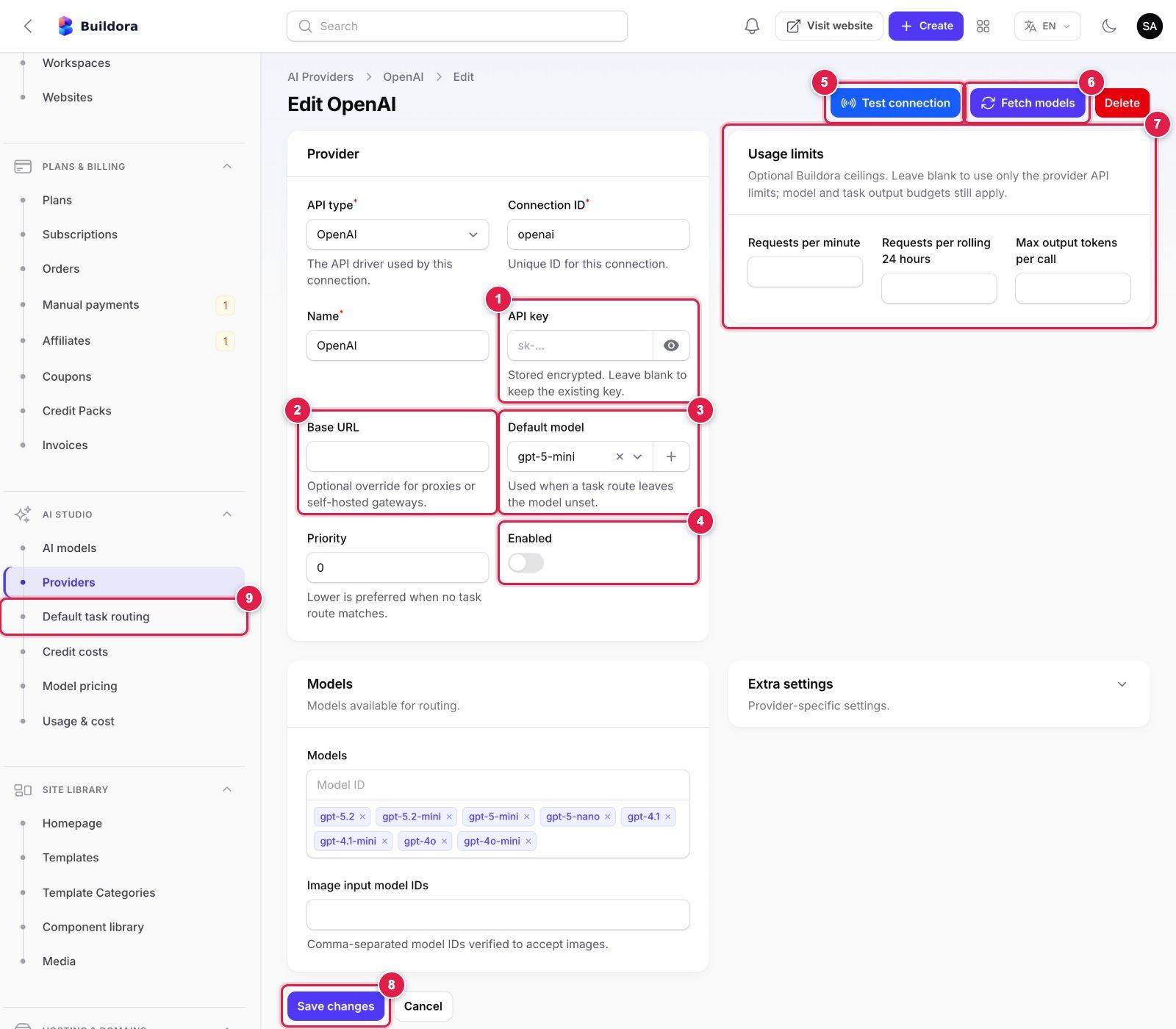
- API key: paste the key from your provider account (OpenAI
sk-…, Anthropic, Gemini, OpenRouter). It is stored encrypted; leave it blank later to keep the stored key. - Base URL: leave empty for the official API; set it only for a proxy or a self-hosted OpenAI-compatible gateway.
- Default model: used when a task route does not name a model.
- Enabled: switch on after the test passes.
- Test connection: sends a tiny request with the saved key and shows the result.
- Fetch models: loads the provider’s current model list into Models.
- Usage limits (optional): requests per minute / per 24 hours and max output tokens, as your own spending guard.
- Save changes before testing.
- Then open Default task routing and pick this provider and model for each task.
Provider API keys are stored encrypted in the database, not in .env. All providers ship disabled with no keys. Adapters: OpenAI (text and gpt-image-1 images), Anthropic Claude (text), Google Gemini (text, and Imagen images if set), OpenRouter, Omniroute (OpenAI-compatible gateway), plus a Fake provider for demos.
| Admin screen | Purpose |
|---|---|
| AI Studio → Providers | API key, base URL, rate/token limits, enable; Test connection, Fetch models |
| AI Studio → AI models | Branded models your users pick from: name, badge, allowed plans, provider/model, fallback, per-task routes (seeded “Buildora Flash”) |
| AI Studio → Default task routing | Primary + fallback provider and model for each of the 10 AI tasks |
| AI Studio → Credit costs | Credits charged per AI action (e.g. generate website 20, generate page 5, copilot 2) |
| AI Studio → Model pricing | What each model costs you, for the cost reports |
| AI Studio → Usage & cost | Every AI call with credits and provider cost |
| Settings → AI | Global AI switch, credit rollover, real images for image slots during generation (off by default: costly), Brave Search key for project research (without it research uses Wikipedia) |
php artisan ai:provider openai --key=sk-... --enable --test --models
php artisan ai:provider anthropic --key=... --enable --test
php artisan ai:provider --list
Make sure Settings → AI → Engine → Demo AI is off in production (AI_FAKE in .env only sets the starting value at install). The Brave Search key and real slot images are set in Settings → AI; the AI timeouts (120 s, connect 10 s, images 180 s) are stored settings too (the old BRAVE_SEARCH_API_KEY, AI_*_TIMEOUT and AI_GENERATE_SLOT_IMAGES keys are only a fallback). Model lists are editable data; check each provider’s current model names and prices.
Google Login
Web client
Google Cloud Console → APIs & Services → Credentials → OAuth client of type Web application, redirect URI
https://api.example.com/auth/google/callback.Admin
Settings → Auth → Google login: enable “Continue with Google”, paste the client id and secret (stored in the database).
Mobile app (optional)
Create Android and iOS OAuth clients and enter their ids in the same section (Android client ID, iOS client ID). The app sends Google ID tokens to
/api/v1/mobile/auth/google; see Mobile App → Google Sign-In.Frontend
NEXT_PUBLIC_GOOGLE_LOGIN=trueshows the button; set it tofalse(and rebuild) when Google login is off.
Captcha
Settings → Captcha: provider Google reCAPTCHA v3 (with a minimum score, default 0.5), reCAPTCHA v2, Cloudflare Turnstile or hCaptcha, plus the site key and secret key (encrypted). It protects the forms on published websites. Login and registration are additionally protected by Laravel rate limiting.
Push Notifications (FCM)
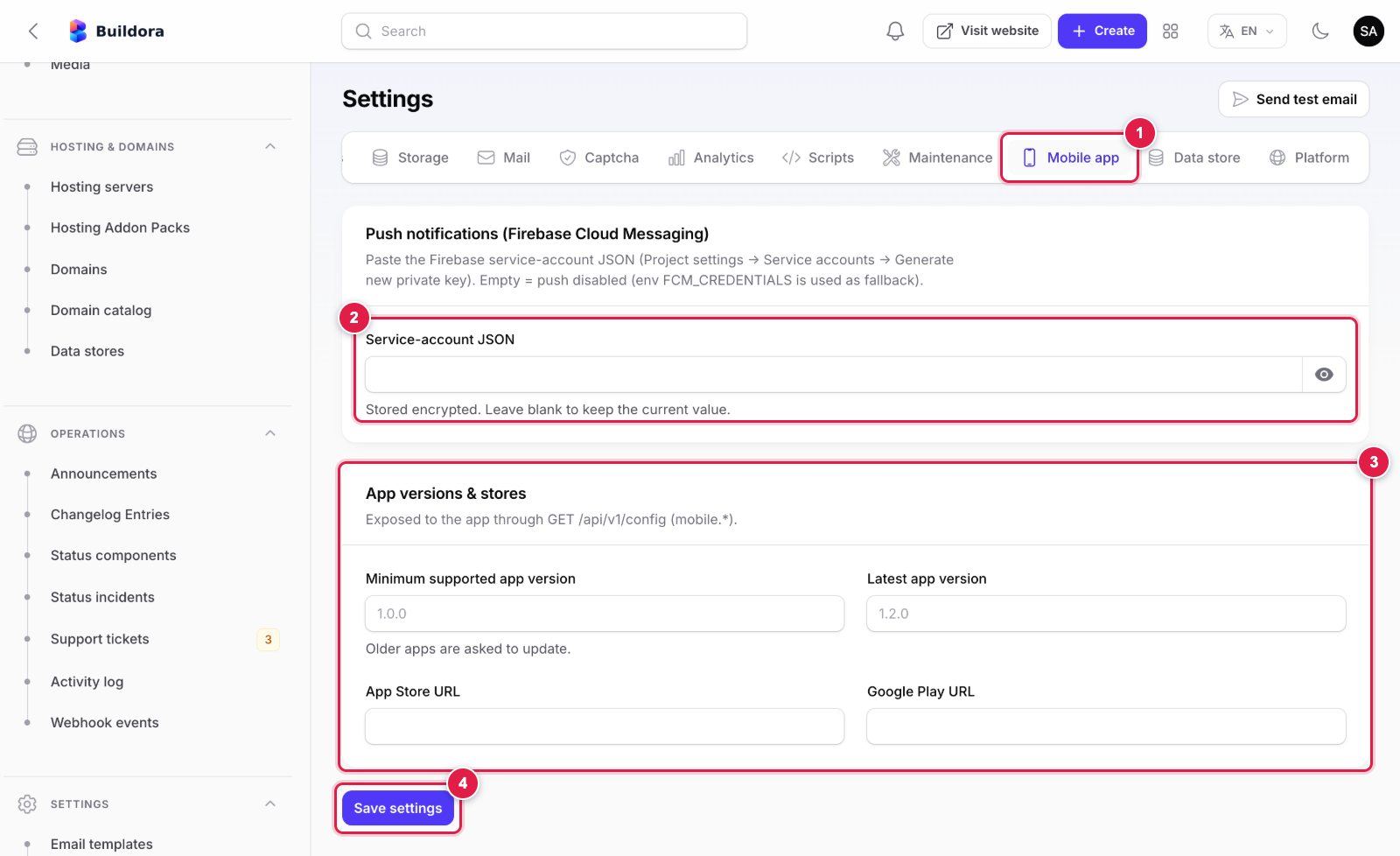
- Mobile app tab of Settings (scroll the tab bar to the right if it is hidden).
- Service-account JSON: in the Firebase console open Project settings → Service accounts → Generate new private key and paste the whole JSON file content. Use the same Firebase project as your app build. Empty = push disabled. Stored encrypted in the database (the old
FCM_CREDENTIALS.envkey is only a fallback). - App versions & stores: minimum/latest version and store URLs, exposed through
GET /api/v1/config. The 1.0.0 app does not read them yet. - Save settings. Pushes are queued, so a queue worker must be running.
Firebase project
Use the same Firebase project as your app build (Mobile App → Firebase).
Service account
Firebase console → Project settings → Service accounts → Generate new private key.
Paste it
Settings → Mobile app → Push notifications (Firebase Cloud Messaging); stored encrypted in the database (the old
FCM_CREDENTIALS.envkey is only a fallback). Empty = push disabled.Queue
Push uses FCM HTTP v1 and is sent from queued notification jobs, so a worker must run.
Users choose e-mail / in-app / push per event in their notification settings (web and app). Pushes are sent for new leads, comments, support replies, finished AI generations and billing events (payment succeeded/failed, subscription activated/expiring, credits low). The same tab has App versions & stores (minimum/latest version, store URLs) which the API exposes in GET /api/v1/config; the 1.0.0 app does not read them yet.
Data Store MySQL (optional)
Each website can have its own database. SQLite works with no setup (files under storage/app/website-data, or DATA_SQLITE_PATH). For managed MySQL (plan feature managed_mysql), Buildora creates one database and restricted user per website: enter an admin MySQL account with CREATE, CREATE USER, DROP and GRANT OPTION in Settings → Data store (stored in the database; the old DATA_MYSQL_* keys are only a fallback). External MySQL (plan external_database) uses the customer’s own server; private and loopback hosts are blocked unless you enable Allow external databases on private networks (keep it off in production).
Updating
Back up
Database,
backend/.envandbackend/storage/app.Upload
Upload the new
backend/files (keep.env,storage/and thepublic/storagelink), then rebuild and restart the frontend (npm ci && npm run build && pm2 restart buildora-frontend, or redeploy on your Node host).Migrate
Settings → System info → Update, or
php artisan buildora:update: migrations, idempotent seeders, cache clear, version bump. The seeders add any new settings rows, clear documentation placeholders (example.com,203.0.113.x,buildora.test) stored by older versions and, withAPP_DEMO=true, (re)create the demo accounts. Email templates, logos and the homepage are seeded on install only, so your edits are kept. It also runsbuildora:sync-plan-features, which adds feature keys that older plans lack without overwriting existing values (preview with--dry-run).Restart
php artisan queue:restartand re-cache config/routes/views if you cache them.Verify
php artisan buildora:doctor.
“Check for updates” in System info compares local version data; there is no update server. Download new versions from your CodeCanyon downloads page. Full upgrade procedure with maintenance mode and version-specific notes: Web Platform → Updating & Upgrades.
Backups
Back up three things; each is useless without the others: the database, backend/.env (especially APP_KEY: without it AI keys, SMTP/S3 passwords, payment credentials and shop gateway credentials cannot be decrypted) and backend/storage/app (media, published sites, exports and SQLite data stores; or your bucket). Managed MySQL data-store databases are separate databases: back them up too. Example nightly cron that keeps 14 days:
30 2 * * * mysqldump --single-transaction -u USER -pPASS buildora | gzip > /backups/buildora-$(date +\%F).sql.gz && find /backups -name 'buildora-*' -mtime +14 -delete
45 2 * * * tar czf /backups/buildora-files-$(date +\%F).tar.gz -C /var/www/buildora/backend .env storage/app
Copy backups off the server and test a restore once: import the dump into an empty database, put back .env and storage/app, run php artisan storage:link, php artisan optimize:clear and php artisan queue:restart.
Monitoring & Logs
php artisan buildora:doctor: env, URLs, cookies, database and migrations, drivers, cron heartbeat, storage, PHP, mail, wildcard DNS, TLS, default vhost, SSL provisioner, managed-MySQL privileges, disk space.--jsonfor monitoring; exit code 1 on failures.- Settings → System info: versions, drivers, extensions, pending and failed jobs, scheduler heartbeat, disk space, warnings.
- AI Studio → Usage & cost, Operations → Webhook events and Activity log (admin actions and impersonation).
- Logs:
storage/logs/laravel.log(useLOG_STACK=daily,LOG_DAILY_DAYSandLOG_LEVEL=warning) andstorage/logs/worker.log; frontend logs withpm2 logs buildora-frontend. - Uptime: monitor the frontend, the API host and one sample published site. Add error monitoring (Sentry, Flare or log alerts) if you like.
Backend .env Reference
Only these keys are yours to set, and the web installer writes them for you (for a manual or CLI install, set only these in backend/.env):
| Key | Example | Notes |
|---|---|---|
APP_URL | https://api.example.com | Public URL of the backend (API + /admin), no trailing slash |
FRONTEND_URL | https://example.com | Public URL of the Next.js frontend, no trailing slash; also the CORS origin (Settings → Platform → Frontend URL wins when set) |
DB_HOST, DB_PORT, DB_DATABASE, DB_USERNAME, DB_PASSWORD | 127.0.0.1, 3306, buildora, buildora | Your MySQL database |
APP_URL=https://api.example.com
FRONTEND_URL=https://example.com

DB_HOST=127.0.0.1
DB_PORT=3306
DB_DATABASE=buildora
DB_USERNAME=buildora
DB_PASSWORD=
Derived from APP_URL + FRONTEND_URL (config/session.php, config/sanctum.php, config/cors.php): the session cookie domain (.example.com), the Sanctum stateful hosts (example.com,api.example.com), secure cookies (on for https://) and the CORS origin. Set SESSION_DOMAIN / SANCTUM_STATEFUL_DOMAINS / SESSION_SECURE_COOKIE in .env only for an unusual host layout: an explicit value always wins over the derived one. Delete leftover placeholder lines such as SANCTUM_STATEFUL_DOMAINS=example.com,… or SESSION_DOMAIN=.example.com.
| Key | Default in .env.example | Notes |
|---|---|---|
APP_KEY | empty | Managed by the installer (generated automatically); never change it after install: encrypted settings depend on it |
APP_INSTALLED | false | Managed by the installer: a successful setup sets true. /install stays locked (403) while this is true, storage/installed exists or the database already contains a super admin, so a lost or reset .env never reopens it |
APP_ENV, APP_DEBUG | production, false | Managed by the installer. Keep these on any public server; use local/true only on your own computer |
DB_CONNECTION | mysql | Managed by the installer |
APP_NAME, APP_TIMEZONE, APP_LOCALE, SESSION_DOMAIN, SESSION_SECURE_COOKIE | Buildora, — | Written by the installer’s Settings step; Settings → General wins at runtime for name and timezone |
LOG_STACK, LOG_LEVEL | daily, warning | Optional production defaults; add LOG_DAILY_DAYS (default 14); use debug only while troubleshooting |
QUEUE_CONNECTION, CACHE_STORE, SESSION_DRIVER | not set (database) | The installer writes database for all three; redis on larger installs (REDIS_HOST, REDIS_PASSWORD, REDIS_PORT). sync only for local dev |
DB_QUEUE_RETRY_AFTER | not set | Keep above 1500 (e.g. 1800) |
APP_DEMO | not set (false) | Public demo only: seeds the demo accounts and the live-demo sandbox on install / update, and shows the demo login buttons on /admin and on the frontend sign-in page (see Demo Mode) |
SSL_PROVISIONER | not set (none) | none or command (+ SSL_PROVISION_COMMAND, SSL_REVOKE_COMMAND) |
HOSTING_DOCKER_* | not set | Optional Docker hosting servers |
AI_FAKE | not set (false) | true = canned output, no API calls (demo/dev only) |
DATA_SQLITE_PATH | not set | Folder for SQLite website data stores |
Moved to the database. Runtime settings live in the settings table (created by SettingSeeder) and are edited in Admin → Settings. The old keys are no longer in .env.example; they are still read only as a fallback.
Old .env keys | Now |
|---|---|
BUILDORA_SITES_DOMAIN, BUILDORA_SERVER_IP | Sites domain and server IP, Settings → Platform (the installer asks for them) |
MAIL_* | Settings → Mail (or the installer); until then the driver is log |
STRIPE_*, STRIPE_TEST_MODE, PAYPAL_*, PAYMENT_MANUAL_ENABLED | Settings → Payments; a fresh install starts in test / sandbox mode |
PAYMENTS_CURRENCY, PAYMENTS_SUCCESS_URL, PAYMENTS_CANCEL_URL, PAYMENTS_PENDING_ORDER_EXPIRY_DAYS, SHOP_REFUND_WINDOW_DAYS | Payment settings: currency (USD), return URLs, pending-order expiry (3 days), store refund window (180 days) |
GOOGLE_CLIENT_ID, GOOGLE_CLIENT_SECRET, GOOGLE_IOS_CLIENT_ID, GOOGLE_ANDROID_CLIENT_ID | Settings → Auth → Google login (web and mobile sign-in client ids) |
FCM_CREDENTIALS | Settings → Mobile app (push) |
| Meta / Google Ads keys | Ads settings |
S3COMPAT_* | Settings → Storage (S3-compatible credentials) |
WORKSPACE_DEFAULT_* | Workspace regional defaults (UTC, USD, en, Y-m-d, week starts Monday) |
PUBLISH_DISK, EXPORT_DISK, EXPORT_TTL_HOURS | Publishing / export disks and export TTL (local, local, 24 h). Keep the private local publishing disk: sites are served by host name only |
BRAVE_SEARCH_API_KEY, AI_GENERATE_SLOT_IMAGES | Settings → AI |
DATA_MYSQL_ADMIN_*, DATA_ALLOW_PRIVATE_HOSTS | Settings → Data store |
Placeholder values (example.com, 203.0.113.x, buildora.test) are never stored as settings, and php artisan buildora:update clears any that an older version stored, so a value you fix is not silently overridden by a stale database row.
Frontend .env Reference
Copy frontend/.env.example to .env.production (or .env.local for development). Values are inlined at build time: run npm run build again after any change.
| Key | Default | Notes |
|---|---|---|
NEXT_PUBLIC_API_URL | https://api.example.com | The backend APP_URL, no trailing slash; must share a parent domain with the frontend |
NEXT_PUBLIC_APP_NAME | Buildora | Fallback name; the live name comes from Settings → General through GET /api/v1/config |
NEXT_PUBLIC_GOOGLE_LOGIN | true | false hides “Continue with Google” |
NEXT_PUBLIC_DOCS_URL, NEXT_PUBLIC_STATUS_URL | empty | Optional links on the Support page |
NEXT_PUBLIC_APP_DEMO | false | Not needed any more: the sign-in page shows the demo logins whenever the backend has APP_DEMO=true. Only forces them on for an older backend. |
NEXT_PUBLIC_SHOW_DEMO_LOGINS | false | Shows the seeder quick-login buttons without full demo mode (always shown in npm run dev); keep false in production |
Check It Works
php artisan buildora:doctorshows no FAIL; System info shows a recent heartbeat and no failed jobs.php artisan schedule:listlists the tasks;supervisorctl statusshows the worker RUNNING;pm2 statusshows the frontend online./installanswers 403;/adminopens; signing in on the frontend works and/api/v1/medoes not return 401.- Settings → Mail → Send test email arrives.
- An AI provider passes Test connection and one AI website builds (proves the worker).
- The site publishes and opens on
https://{subdomain}.sites.example.com; a form submission on it creates a lead. - A sandbox payment activates the plan only after the webhook arrives.
Troubleshooting
| Symptom | Fix |
|---|---|
Every page redirects to /install | Buildora finds no installation: APP_INSTALLED is not true, there is no storage/installed marker and the configured database holds no super admin (the installation was never finished, or after a server move .env and storage/ were not copied, or DB_* points at an empty or unreachable database). Finish the installer, or restore .env and storage/installed, set APP_INSTALLED=true and run php artisan config:clear. Before installation, published-site hosts redirect to /install too. |
/install answers 403 “already installed” | Expected: the installer stays locked while APP_INSTALLED=true, the persistent storage/installed marker exists or the database already contains a super admin, so a lost or replaced .env, a database outage or an update cannot reopen it. If the page says APP_INSTALLED is not true, your .env was replaced: set APP_INSTALLED=true and run php artisan config:clear. To reinstall on purpose: back up, delete storage/installed, set APP_INSTALLED=false, run php artisan config:clear and use an empty database, or run php artisan buildora:install --force from the shell. |
| Frontend shows a 503 | It cannot reach the backend: check NEXT_PUBLIC_API_URL (then rebuild) and that the API host answers. |
419 CSRF token mismatch, or login succeeds but /api/v1/me returns 401 | The two hosts do not share a parent domain, or a leftover SESSION_DOMAIN / SANCTUM_STATEFUL_DOMAINS line in .env (e.g. the old example.com placeholder) overrides the derived value: delete it. Run config:clear after editing. |
| CORS error in the browser console, or the pricing page shows “Plans are not available” | The frontend URL (Settings → Platform, else FRONTEND_URL) does not exactly match the frontend origin (scheme + host + port). |
The API host redirects to example.com, or the browser reports ERR_INVALID_REDIRECT | The stored frontend URL is a placeholder or malformed. Fix it in Settings → Platform (https://api.example.com/admin still works; a malformed URL now falls back to /admin), or run php artisan buildora:update to clear placeholders. |
| The API host is treated as a published site | The sites domain is the parent domain of the API host (e.g. example.com for api.example.com). Use sites.example.com or a separate domain in Settings → Platform. |
| AI generation stays “queued” | No queue worker: start Supervisor or add the shared-hosting queue cron. |
| Builds start twice or stop halfway | Raise DB_QUEUE_RETRY_AFTER above 1500 and use --timeout=1500; raise PHP and proxy timeouts. |
| AI returns the same demo text | AI_FAKE=true; set it to false and add a real provider key. |
| “Test connection” fails for a provider | Wrong key or base URL, no credit on the provider account, or the server cannot reach the provider (firewall). |
| Published site shows a TLS error | The wildcard certificate for *.SITES_DOMAIN is missing or the wildcard DNS record is not set. |
| Custom domain stays pending | DNS not propagated or wrong A record; check the server IP in Settings → Platform, make the backend vhost the default_server, and check SSL_PROVISIONER. |
| Images 404 | Run php artisan storage:link; with S3 check the public/CDN URL and bucket policy. |
| No e-mails | No mailer configured yet (the driver is log) or wrong SMTP settings in Settings → Mail; use Send test email and check storage/logs. |
| No push notifications | No FCM service account, a different Firebase project from the app, or no queue worker. |
| Payment not activated | Webhook not registered or wrong signing secret; see Operations → Webhook events. Stripe plans activate only when the Checkout session is paid. |
| “Invalid Stripe/PayPal webhook signature” | Secret / Webhook ID from another endpoint, app or mode (test vs live), or a CDN rewriting the body: see CDN bypass paths. |
| Scheduler warning in System info | Cron is missing, runs as another user or uses a different PHP binary; use the full PHP path. |
Changed NEXT_PUBLIC_* but nothing changed | They are compiled in: npm run build and restart. |
Third-Party Costs
The services below are run by other companies. You open your own account with each service you use, accept its terms and pay its fees directly; nothing here is included in the item price.
- AI providers (OpenAI, Anthropic, Google Gemini, OpenRouter, Omniroute or another OpenAI-compatible gateway): pay per use; optional Brave Search API.
- Payment gateways: Stripe and PayPal for selling your plans (your merchant accounts, their transaction and currency fees). Your customers’ shops use their own Stripe, PayPal, SSLCommerz or bKash merchant accounts and pay those fees themselves.
- Firebase Cloud Messaging (your Firebase project) for push, and Google Cloud OAuth for Google login.
- E-mail delivery: an SMTP provider or Amazon SES.
- Storage: optional Amazon S3 or S3-compatible storage (Cloudflare R2, DigitalOcean Spaces, Wasabi, MinIO).
- Hosting, domains and SSL certificates, an optional Docker hosting VPS, Google Ads / Meta Ads API access and captcha providers.
- Apple Developer Program and Google Play Console accounts to publish the app.
Overview with cost models: Web Platform → Third-Party Services & Costs.
